
Datawarehouse.io Accounts and User Limits
Every Datawarehouse.io user receives their own personal Datawarehouse.io account when they sign up.
Included with each Datawarehouse.io account is the ability invite up to 5 users to work inside that account. If you would like this limit increased to a number greater than 5 please contact the Help Desk here.
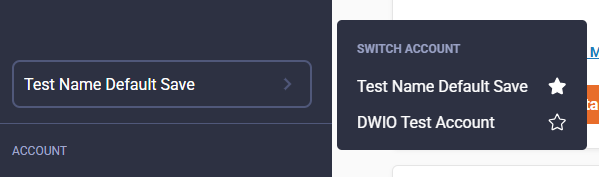
Account Switcher
All users have a personal account that they can use. A users personal account is where they access their account profile page to perform actions like changing their password, setting up MFA, transferring their account ownership, or deleting their account.
User Permissions
There are three types of access levels to a Datawarehouse.io account.
- Account Owner
- Admin
- Member
Account Owner Permissions
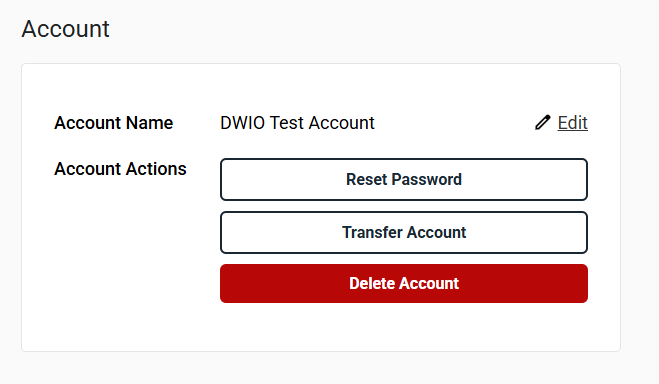
Account Owners have access to everything in a Datawarehouse.io account. They are able to transfer ownership of their account to another user by visiting https://app.datawarehouse.io/account/profile and selecting the Transfer Account button.
Account Owners are the only type of access level that can delete a Datawarehouse.io account.
Account Owners can also define an account name by clicking the Edit button next to account name. The default account name for accounts is <FIRSTNAME>'s Account so it is recommended that the account owner define a custom account name.
Only the Account Owner can access the Account Profile page to change an accounts name, transfer the account, or delete the account.
Admin Permissions
Users with the Admin Access Level to a Datawarehouse.io account are able to do everything in a Datawarehouse.io with the exception of accessing the Account Profile page.
- Manage Subscriptions
- Manage Users
- Manage Billing Details
- Manage Payment Methods
- View Invoices
- Use Apps
- Sign-up for Apps
If an Admin needs to change their own password, set up MFA, or delete their own account they will need to use the Account Switcher in the menu to visit their account.
Member Permissions
Users with the Member Access Level to a Datawarehouse.io account have a restricted set of permissions that allow them to only use existing applications and view other users in the account.
- Use Apps
- View Users
If an Member needs to change their own password, set up MFA, or delete their own account they will need to use the Account Switcher in the menu to visit their account.
Adding Users
- Visit https://app.datawarehouse.io/account/users-account
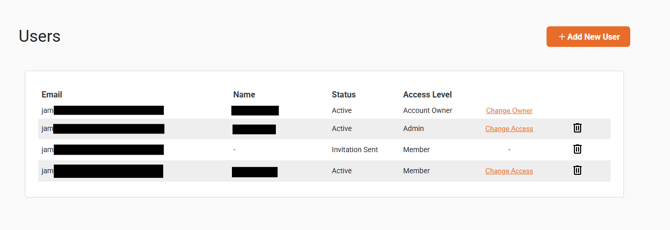
- From here you can select the + Add New User button to add new users to your account.
- Users are listed in the control panel as seen below.
- Users are listed in the control panel as seen below.
- The invitation to join an account will be sent via email to the email address of the user that has been invited.
- New users without an existing Datawarehouse.io account must create an account at https://app.datawarehouse.io/ before accepting the invitation.
- Existing users with a Datawarehouse.io account only need to log in and accept the invitation from their email inbox.
Removing Users
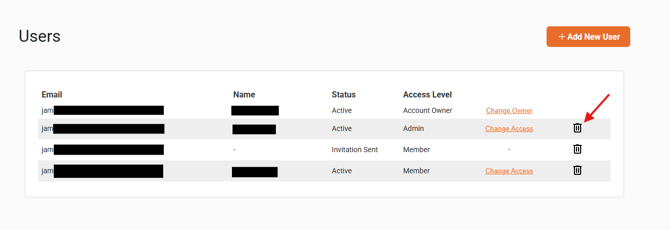
- To remove a user you must select the trash can icon in the row of the user account you want to remove. This will remove the users access from your account. It will not delete the user account completely.
- Users can delete their own accounts completely from the system by visiting https://app.datawarehouse.io/account/profile.
- Users can delete their own accounts completely from the system by visiting https://app.datawarehouse.io/account/profile.