
Introduction
The Ultimate Data Export app consists of an export to Microsoft Azure's EU West Data Center where the data is manipulated into a readable format in Excel. When the export is ready, the end user will receive an email with a link to download that export.
Account Creation
1. Create an account at https://app.datawarehouse.io/
2. To connect to the Ultimate Data Export app, please navigate to the Ultimate Data Export selection from the listed options in the main dashboard page of your Datawarehouse.io account and then click on the Get Started button for the app selection.
3. From there, click on the Create New Export button to be re-directed to a version selection page. At which point, please make your selection for which version of the Ultimate Data Export app you wish to purchase and click on Get Started for that selection.
4. Then, you will see a window labeled Connect Your HubSpot Account. Click on the button labeled Authorize with HubSpot to be redirected to HubSpot's OAuth 2.0 page.
5. Login to HubSpot if you are not already and select the HubSpot account you wish to connect to.
6. Authorize the app to connect to your HubSpot portal by clicking the Connect App button.
- Please note: Super Admin access is required for the app to have the permissions needed to scan for and retrieve your data within HubSpot.
Please ensure that the person signing up for and performing the authorization is a Super Admin for your HubSpot portal.
7. You are then re-directed to the checkout screen. Please fill out all required information in order to complete your purchase.
Activation
Once you have successfully signed up on our website, all you need to do is check out and authorize your HubSpot portal to our application.
Upon authorization and checkout, the export will enter our processing queue. It can take anywhere from 1-4 hours depending on the size if your export.
You will receive an email when it is ready to download. Please be sure to download your export within 72 hours of receipt as we automatically delete the files from our service after that point.
If you have more than 10,000 records in a single table you will need to use the Pro version of the app for a full export.
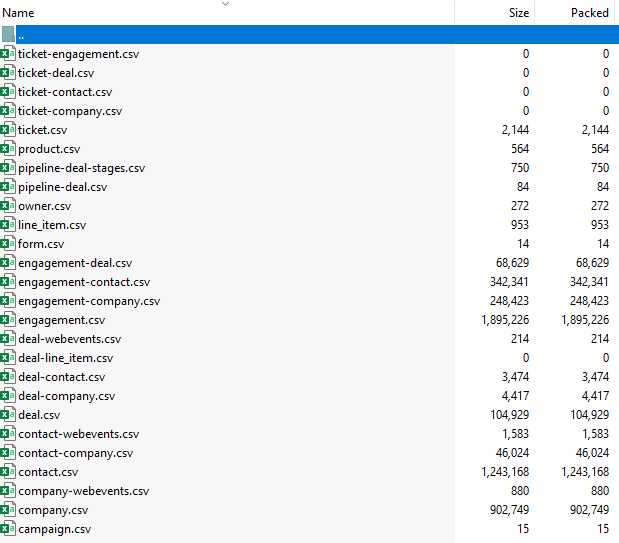
Your file will contain a series of spreadsheets that contain your exported HubSpot data. It will look something like this.
How to uninstall the app
For instructions on how to uninstall the Datawarehouse.io app in your data source, please review the following documentation.
*Please note this does not cancel your subscription. To do that, please visit:
Data Security
- Only you will have access to your export. Your data is never harvested or sold and is automatically deleted after 72 hours.
- A Read Only with the email ultimatedataexport@datawarehouse.io will be created in your Portal for QA/QC Purposes. You may remove this user at any time.
- User authentication for HubSpot is done using OAuth 2.0 protocol as per the best practice in industry.
- This application is GDPR Compliant
- If there is information missing from a property it could be because that fields is improperly configured in HubSpot.