
The Sync Scheduler feature grants Database Sync users the ability to dictate when their scheduled resyncs will occur within a specific time frame. This can help with reducing the amount or resources your database uses when syncing data.
To locate, access, and learn how to use the Sync Scheduler feature, please review the following instructions:
1. Log into your Datawarehouse.io account page at https://app.datawarehouse.io/
2. From the main dashboard, navigate to the My Apps section and click the button corresponding to the Database Sync app.
3. On the app details page, click on the label that corresponds to your subscription under the Sync Name column to open your user panel.
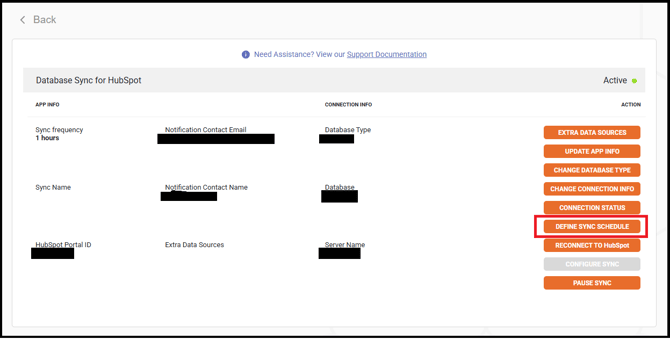
4. In your user panel, locate and click on the Define Sync Schedule button (see example below):
5. Here, you can define two things.
-
-
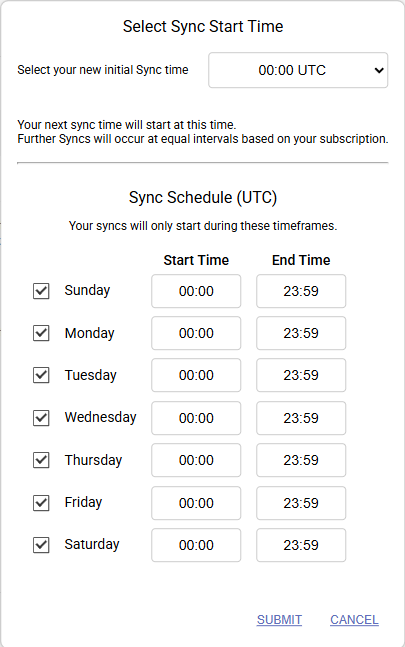
When the initial sync will begin.
-
This defines when the first sync of each day begins. Further syncs beyond the first one of the day occur at equal intervals based on your subscription.
-
-
The timeframes you would like the syncs to run in can also be defined. Just select the days and timeframes that you want the syncs to run. (see example below):
-
6. Once you have configured your sync run times to your specifications, simply click on Submit and the newly scheduled syncs will go into effect within 24 hours.
Please note: This feature is only available for subscriptions with the following refresh rates.
- 6 Hour
- 1 Hour
- 15 Minute
Users on a 24 hour refresh rate plan do not have access to these features. If you would like to make use of these feature, we recommend you upgrade your Database Sync subscription to either 6 hour, 1 hour, or 15-minute resync plans by logging into your Datawarehouse.io account page at https://app.datawarehouse.io/ and navigate to the Subscriptions section of the account page.