
Profile Page and MFA
To enable MFA for a user's Datawarehouse.io account, they must log into the account that they are the Account Owner of and visit https://app.datawarehouse.io/account/profile. Once a user enables MFA for their user account, they will be forced to use MFA when logging into any Datawarehouse.io account that they have access to.
The account profile page allows users to perform the following actions.
- Change their account name
- Change their first name
- Change their last name
- Enable MFA
- Disable MFA
- Transfer the account
- Reset passwords
- Delete the account
This article explains how to enable or disable MFA for a given Datawarehouse.io user.
Enabling MFA
-
To enable MFA, users must click the enable button located in the Multi-Factor Authentication section of their profile page.
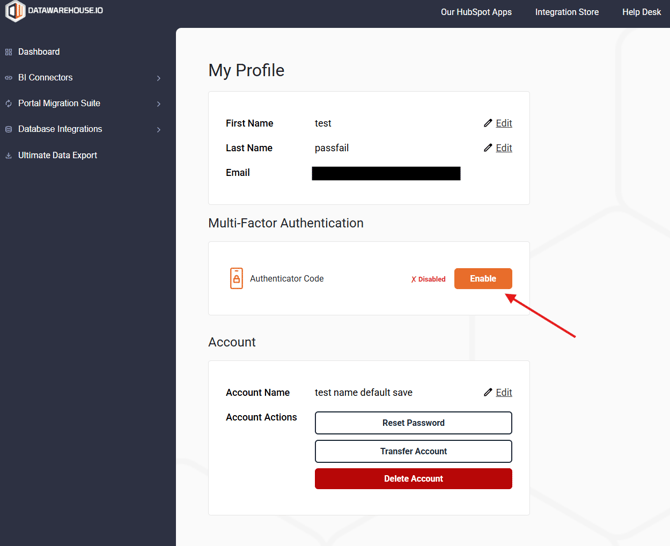
- After a user selects the Enable button, a pop up window with a QR code will appear. Users must set up their authenticator app and enter the one time code in the pop-up window in order to complete the MFA setup process.
- If this process is interrupted or not completed, users will need to refresh the profile page to start again.
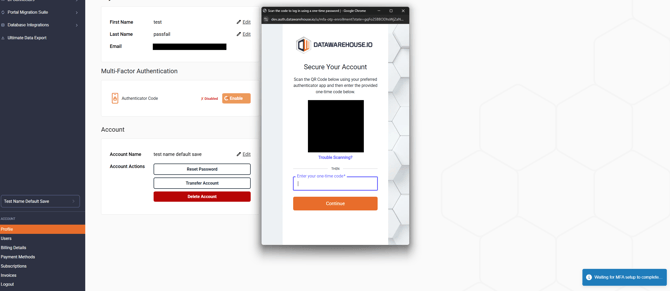
- If this process is interrupted or not completed, users will need to refresh the profile page to start again.
- Upon successful setup of MFA, a notification will indicate MFA has been setup successfully. The UI will also indicate it is enabled with a green checkmark and the green Enabled text.
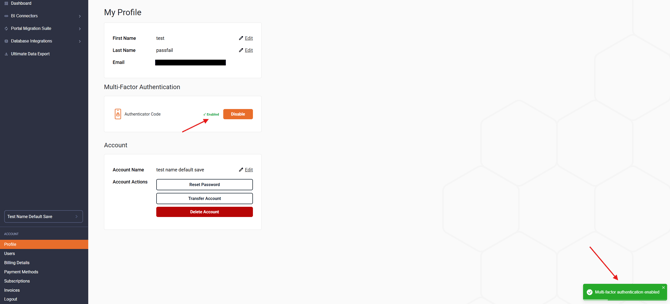
- After successfully enabling MFA, users will be prompted to complete MFA when attempting to log into Datawarehouse.io.
Disabling MFA
-
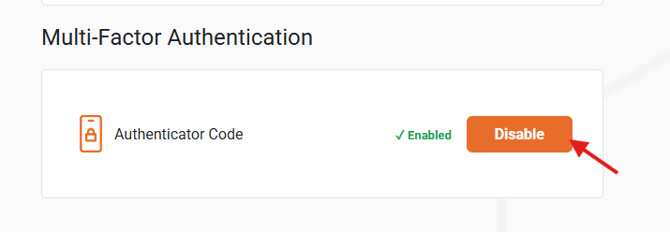
To disable MFA for a Datawarehouse.io user account, a user must visit the profile page at https://app.datawarehouse.io/account/profile and select the Disable button.
Request MFA Activation or Removal
If a user has lost access to their MFA token or need further assistance logging into their Datawarehouse.io account, they can reach out to help@datawarehouse.io for assistance.