
Can Scheduled Syncs Be Moved to Off-Peak Hours?
At sign up the system automatically assigns scheduled resyncs for users of all BI Connector and Database Integration apps. Users on the 24 Hour refresh rate plan cannot change the sync time to occur outside of the preset schedule.
Options for Changing Sync Frequency
If you require the ability to adjust your scheduled resync time, you will need to upgrade your subscription to a plan that allows for more frequent refresh rates. Specifically, upgrading to the 6-hour refresh rate plan or higher will enable you to change your sync times.
How to Upgrade Your Subscription
- Log into your Datawarehouse.io account.
- Navigate to the "Subscriptions" tab.
- Review your current subscription status and details.
- Select the option to upgrade your subscription to the 6-hour refresh rate plan or higher.
Once the upgrade is completed, you can adjust your sync times:
- Navigate to the main dashboard home page and select the app you are currently subscribed to from the "My App" section.
- Click on the label of your Connector located under Sync Name in the Connector details page to take you to your user panel.
- Once in your user panel, click on the "Select Sync Time" button.
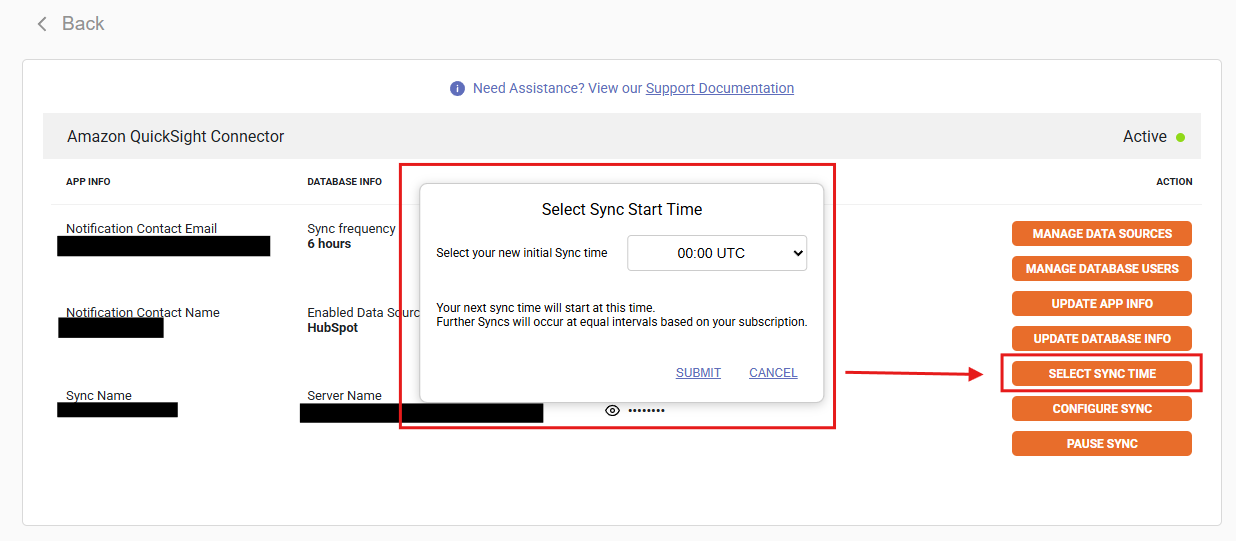
- Choose your preferred sync time, keeping in mind that the times will be displayed in UTC format.